
We announced our partnership with Dell on Tuesday. Since then, I've been asked the same question three times: "So what does an AI running at the customer's site actually look like?"
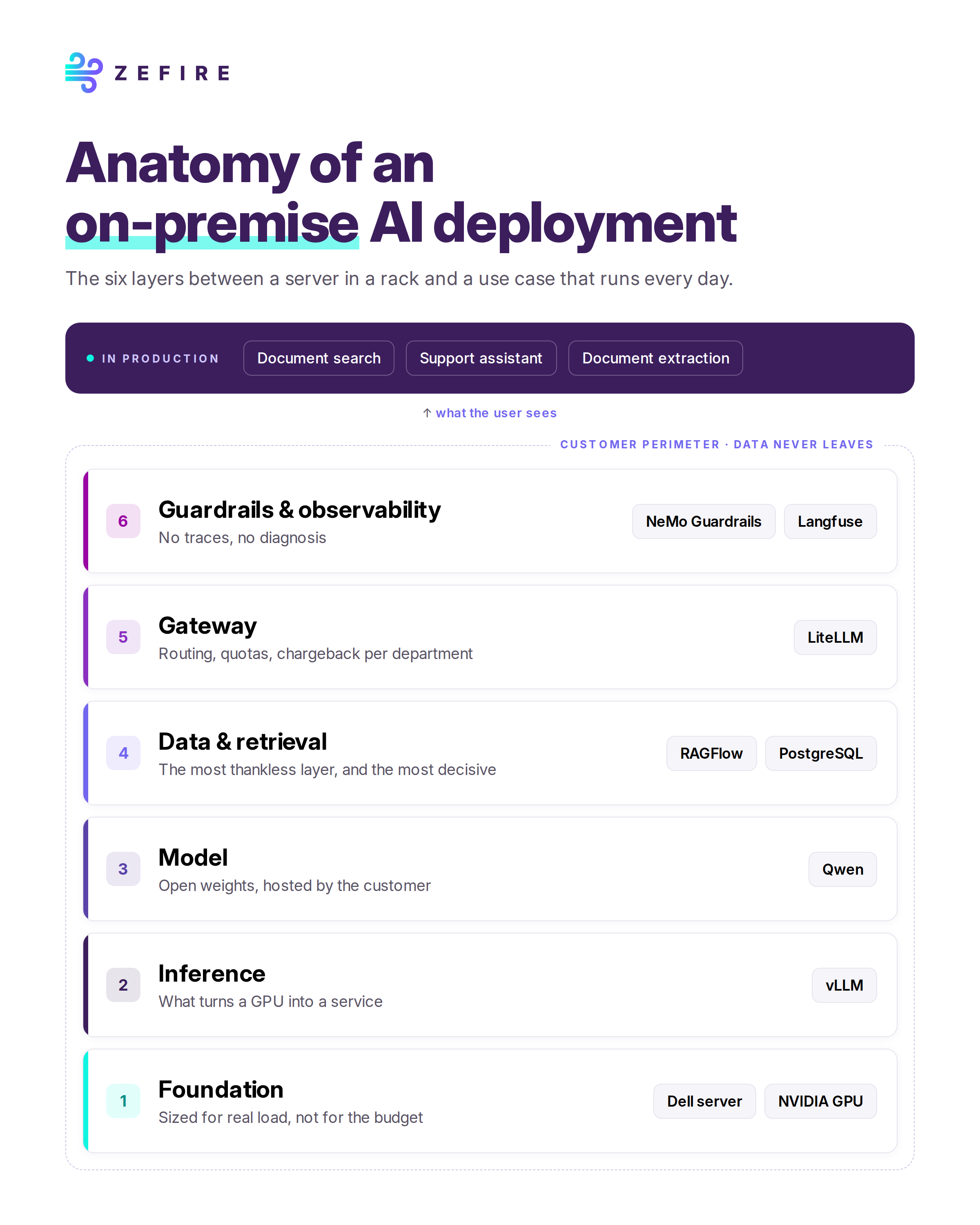
It's a good question. People talk a lot about "sovereign AI" and "on-prem AI", but you rarely see what's inside. So here is the full anatomy, layer by layer, from the hardware to the use case.
1. The foundation: servers and GPUs
It all starts with hardware: a Dell server and NVIDIA GPUs.
The only real trap at this level is sizing. Start from the actual workload, not the available budget. Three questions matter:
- How many concurrent users?
- How long are the contexts? (long documents, conversation history)
- What response time is acceptable?
An undersized GPU doesn't make a slow project. It makes an abandoned one. Users don't come back to a tool that keeps them waiting.
2. The inference engine: vLLM
A graphics card on its own isn't enough. You need a layer that turns it into a service, and that's the job of the inference engine. We use vLLM, which handles request batching, memory and throughput.
This is the layer where a demo for one user becomes a service used by two hundred people at the same time. Many projects that "worked fine in the POC" fail right here.
3. The model: Qwen by default
Our default model is Qwen. It has open weights, it's hosted on the customer's servers, and it makes no outbound calls. The data never leaves the infrastructure.
We pick the model for the task, not for this month's leaderboard. Benchmarks change every week, while a production use case needs to stay stable.
One rule to remember: an average model served well beats an excellent model served badly.
4. The data: RAGFlow and PostgreSQL
This is the least glamorous layer, and also the one that matters most.
- RAGFlow handles document ingestion and search.
- PostgreSQL stores structured and application data, with a semantic layer on top.
The quality of a document assistant doesn't depend on the choice of LLM. It comes down to two less visible things: how documents are chunked and how access rights are managed. Poor chunking gives off-target answers. Poorly managed rights give you an assistant you can't open up to the whole company.
5. The front door: a gateway (LiteLLM)
Every request goes through a gateway. We use LiteLLM, which provides:
- routing between models;
- quotas;
- traceability;
- chargeback by department.
Without a gateway, nobody knows who's using what. After six months, the project can no longer be managed: there's no way to justify costs, arbitrate between teams or plan for growth.
6. Guardrails and observability: NeMo Guardrails and Langfuse
Two components complete the architecture:
- NeMo Guardrails to filter inputs and outputs;
- Langfuse for observability: traces, latency, answer quality.
The logic is simple. Without traces, you can't diagnose. Without diagnosis, you can't improve.
At the end of the chain: a use case
All these layers exist only to run a use case, for example:
- document search across a technical knowledge base;
- support for customer service teams;
- data extraction from incoming documents.
Nothing spectacular, but these are tools that run every day and that teams actually use.
What the diagram doesn't show
An architecture fits in a diagram. What takes the most time is what you don't see in it:
- taking over the existing document base: mixed formats, duplicates, outdated versions;
- integration with the information system: directory, access rights, business applications;
- operations once in production: updates, monitoring, changing usage.
That's exactly the work we do with the integrators who deploy these architectures for SMEs and mid-sized companies.
Are you an integrator looking to offer on-site AI to your customers? Let's talk.

.svg)

.svg)